
What is Miro?
Miro is an online interactive whiteboard platform that allows you to collaborate with others in real time or asynchronously. It is a tool designed to help you brainstorm, plan, and communicate with your peers visually. Think of it like a digital whiteboard where you can write notes, post images, and work alongside your classmates from anywhere in the world.
Why are we using Miro?
For our induction activities, Miro will be your virtual canvas. You will use it to:
- Get to know your fellow students.
- Learn more about the university and the resources available to you at the University.
- Participate in fun, interactive exercises that will help set the stage for your learning journey.
How do you log in to Miro?
To access your University membership perks, you need to sign in with your SSO (Single Sign-On) credentials. Your SSO credentials are the same as your university log-in (username). It is what you would use to log in to any university services, such as EASE or MyEd Portal, and it can look like these examples below:

Clicking here will take you directly to the SSO log-in page, where you will be prompted to use your SSO credentials. Remember to tick “Remember me” for future access:

Click on “Continue” on Miro after you put in your SSO credentials. You will be prompted to put the same credentials in a couple more times before you are signed in, so don’t worry, that is expected!:
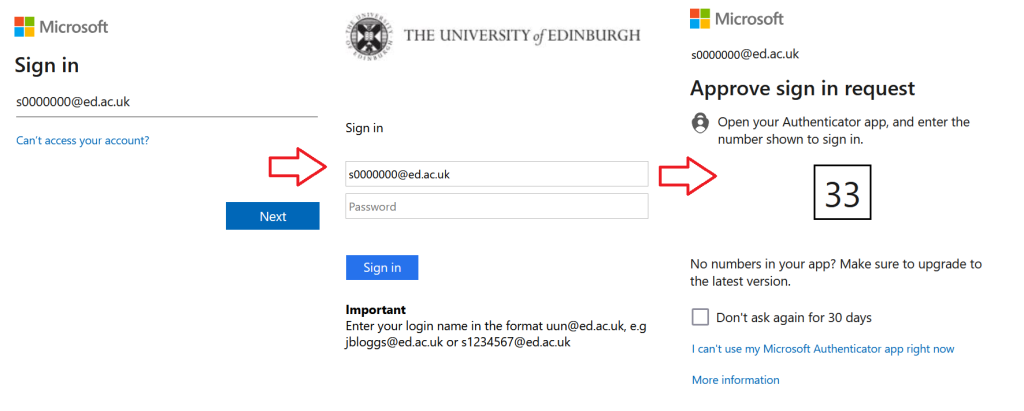
After you approve your sign in request, you will be logged in to Miro.