
The following tips will help Media Hopper Replay successfully record your lecture.
If you have any questions, there are instruction sheets on the desk.
If you have any trouble with the equipment, please phone Easter Bush’s AV Emergency Helpline on 506 205
Emergency Lecture Recording
All ‘Lectures’ listed in the Central Timetable should be automatically scheduled to record (once in the Timetable, they generally are auto-scheduled overnight).
However, if you want to record an event that hasn’t been timetables as a ‘Lecture’ – or your ‘Lecture’ has a last-minute room change, or you find the desk light hasn’t turned amber or red to show it is preparing to, or has started recording then, in an emergency, you can start an Ad Hoc recording, but best to try that out ahead of time to make sure you have a Learn course you can recording into.
Microphone
Take a charged-up wireless mic from the charging cradle, switch it on, and take it off mute. Attach the microphone near your neck.
If a student asks a question, repeat the question before answering it.
The desk light
Red light means it’s recording, and pressing the desk light firmly once will pause the recording (desk light changes to flashing amber), pressing again will resume recording (desk light returns to solid red).
PowerPoint ‘Presenter View’
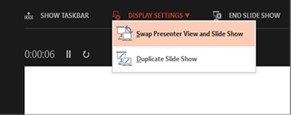
If the PowerPoint ‘Presenter View’ are showing on the wrong screens (with students seeing the Presenter View instead of just the current slide), use the Display Settings menu in the top-left of the Presenter View screen to select Swap Presenter View and Slide Show.
At the end of the lecture
It’s a good idea to pause the recording and leave the desk light flashing amber. That way the recording ends neatly, rather than continuing until the scheduled time ends.
Using your own laptop
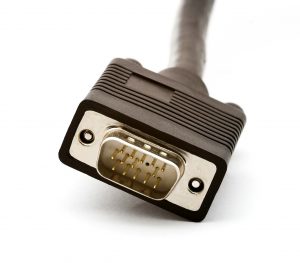
If you want to use your own laptop, you can plug it into either the HDMI or the VGA cables on the desk (see below for note about using a Mac laptop).
Recently refurbished rooms (LT1, LT2, G.01, Roslin Auditorium) have a Kramer K-Spider that you can connect laptops to using HDMI, DisplayPort, mini DisplayPort, or USB−C connectors.

NOTE – Mac Laptops
If you are using a Mac laptop, there is currently a problem using the HDMI cable. A Digital Rights Management (DRM) system might block your Mac’s signal, and although it will project without issue in the lecture theatre, the Media Hopper Replay recording will display a green screen instead of the presentation slides.
Please connect your Mac laptop using the USB-C cable (if available), or the VGA cable (may require a different adaptor). Or open your presentation on the presenter PC available in the room.