
Always tap or blow on the mic before using it, to confirm you can hear it amplified in the room. This will confirm that it’s switched on, and not muted.
University guide
See the University’s guide at: Wearing microphones
Further notes
Switch on older microphones
Note that the above University guide concerns the new microphones that are in our recently refurbished rooms (the main lecture spaces). But many of our rooms still have older microphones.
To switch on older lapel mics, press the sides and flip the front flap down. Then press and hold the On button until the display lights up.
To switch on older Catchbox mics, twist the centre column to disengage the magnets, and remote. Switch the on/off switch to switch on, and check the battery status light (spare batteries are available from the Reception desk). Replace the central column.
Check battery status
Check the battery indicator on mic display:
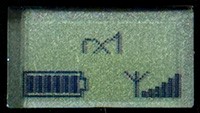
Note that the red light on the front of the lapel mics that appears to be labelled ‘Low Bat.’ Is actually just the light to say it’s switched on.
Ensure the physical ‘mute’ switch is not switched on
Every mic has a physical mute switch that people often switch on at the end of their lectures – if the switch is towards the ‘Mute’ label, then the mic is muted.
The display on the mic will also show whether the mic has ‘MUTE’ switched on or not – however, the ‘MUTE’ sign will briefly appear when the mic is switched on, so wait a few seconds to confirm if the mic is muted or not.
Lapel mic mute switch:

Handheld mic mute switch:

At the end of your lecture, replace mics in charging cradle
After your lecture, make sure you do not wind the mic cable around the transmitter unit, as that could damage the cable.
Also make sure you push the mics back in the charging cradle the correct way around.
They will only press down completely and light the solid red light for the charging bay if you have put the mic in the correct way around.
If you see a flashing red light or no light, then it’s not seated properly – pull it out and try again.
Switch off the projectors
Unless there is a lecture immediately following yours, please switch off the projectors using the ‘Power off’ button on the Extron touch screen.